mirror of
https://github.com/DeNNiiInc/dbgate.git
synced 2026-04-18 05:36:00 +00:00

194 lines
9.2 KiB
Markdown
194 lines
9.2 KiB
Markdown
[](https://www.npmjs.com/package/dbgate-serve)
|
||

|
||
[](https://snapcraft.io/dbgate)
|
||
[](https://snapcraft.io/dbgate)
|
||
[](https://github.com/prettier/prettier)
|
||
|
||
<img src="https://raw.githubusercontent.com/dbgate/dbgate/master/app/icon.png" width="64" align="right"/>
|
||
|
||
# DbGate - (no)SQL database client
|
||
|
||
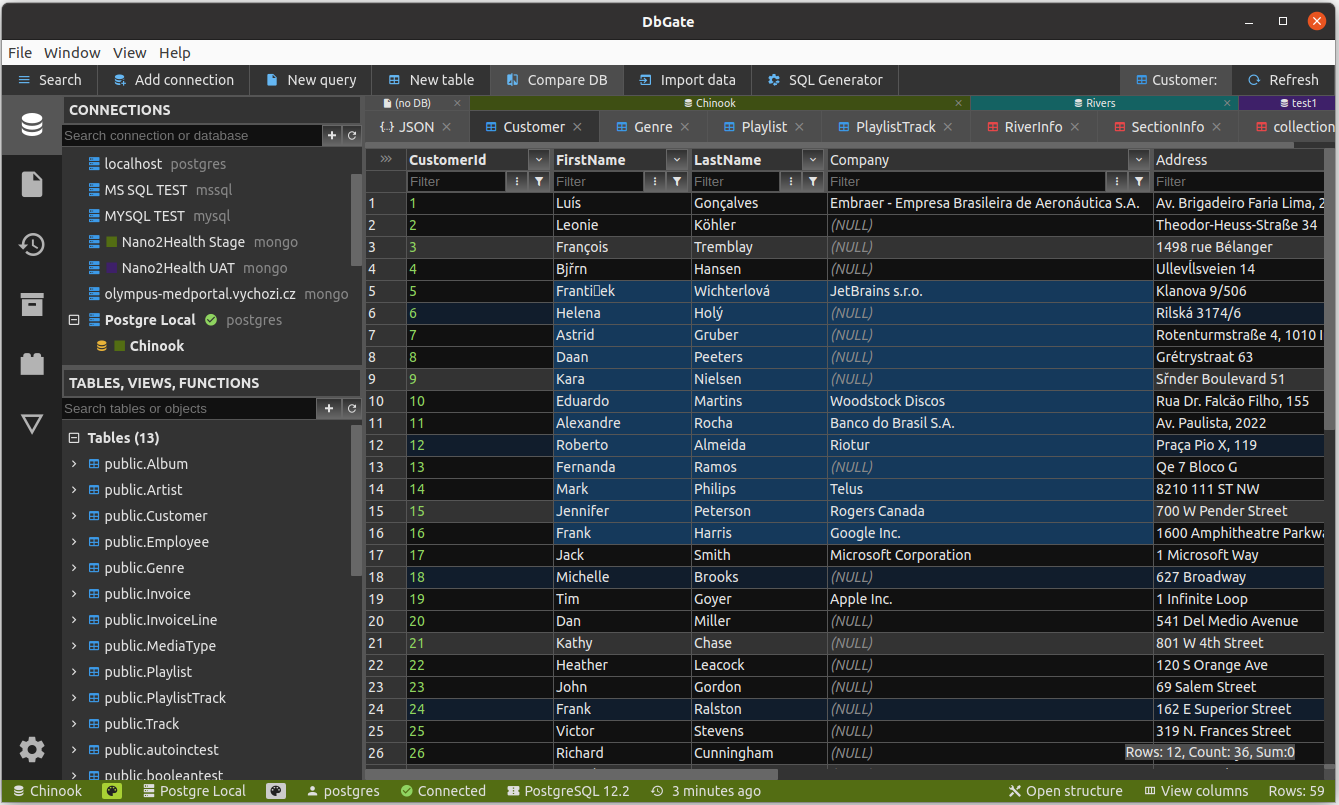
DbGate is cross-platform database manager.
|
||
It's designed to be simple to use and effective, when working with more databases simultaneously.
|
||
But there are also many advanced features like schema compare, visual query designer, chart visualisation or batch export and import.
|
||
|
||
DbGate is licensed under GPL-3.0 license and is free to use for any purpose.
|
||
|
||
* Try it online - [demo.dbgate.org](https://demo.dbgate.org) - online demo application
|
||
* **Download** application for Windows, Linux or Mac from [dbgate.io](https://dbgate.io/download/)
|
||
* Looking for DbGate Community? **Download** from [dbgate.org](https://dbgate.org/download/)
|
||
* Run web version as [NPM package](https://www.npmjs.com/package/dbgate-serve) or as [docker image](https://hub.docker.com/r/dbgate/dbgate)
|
||
* Use nodeJs [scripting interface](https://docs.dbgate.io/scripting) ([API documentation](https://docs.dbgate.io/apidoc))
|
||
* [Recommend DbGate](https://testimonial.to/dbgate) | [Rate on G2](https://www.g2.com/products/dbgate/reviews)
|
||
* [Give us feedback](https://dbgate.org/feedback) - it will help us to decide, how to improve DbGate in future
|
||
|
||
## Supported databases
|
||
* MySQL
|
||
* PostgreSQL
|
||
* SQL Server
|
||
* Oracle
|
||
* MongoDB
|
||
* Redis
|
||
* SQLite
|
||
* Amazon Redshift (Premium)
|
||
* CockroachDB
|
||
* MariaDB
|
||
* CosmosDB (Premium)
|
||
* ClickHouse
|
||
* Apache Cassandra
|
||
* libSQL/Turso (Premium)
|
||
* DuckDB
|
||
* Firebird
|
||
|
||
|
||
<a href="https://raw.githubusercontent.com/dbgate/dbgate/master/img/screenshot1.png">
|
||
<img src="https://raw.githubusercontent.com/dbgate/dbgate/master/img/screenshot1.png" width="400"/>
|
||
</a>
|
||
<a href="https://raw.githubusercontent.com/dbgate/dbgate/master/img/screenshot2.png">
|
||
<img src="https://raw.githubusercontent.com/dbgate/dbgate/master/img/screenshot2.png" width="400"/>
|
||
</a>
|
||
<a href="https://raw.githubusercontent.com/dbgate/dbgate/master/img/screenshot4.png">
|
||
<img src="https://raw.githubusercontent.com/dbgate/dbgate/master/img/screenshot4.png" width="400"/>
|
||
</a>
|
||
<a href="https://raw.githubusercontent.com/dbgate/dbgate/master/img/screenshot3.png">
|
||
<img src="https://raw.githubusercontent.com/dbgate/dbgate/master/img/screenshot3.png" width="400"/>
|
||
</a>
|
||
|
||
<!--  -->
|
||
|
||
## Features
|
||
* Browse table data with many filtering options, Excel-like filters, multi-value filters
|
||
* Table data editing, with SQL change script preview
|
||
* Edit table schema, indexes, primary and foreign keys
|
||
* Compare and synchronize database structure
|
||
* ER diagram
|
||
* Light and dark theme, next themes available as plugins from github community
|
||
* Huge support for work with related data - master/detail views, foreign key lookups, expanding columns from related tables in flat data view
|
||
* Query designer - visual SQL query builder without writing SQL code. Complex conditions like WHERE NOT EXISTS.
|
||
* Query perspectives – innovative nested table view over complex relational data, something like query designer on MongoDB databases
|
||
* Form view for comfortable work with tables with many columns
|
||
* JSON view on MongoDB collections
|
||
* Explore tables, views, procedures, functions, MongoDB collections
|
||
* SQL editor
|
||
* execute SQL script
|
||
* SQL code formatter
|
||
* SQL code completion
|
||
* Add SQL LEFT/INNER/RIGHT join utility
|
||
* Mongo JavaScript editor, execute Mongo script (with NodeJs syntax)
|
||
* Redis tree view, generate script from keys, run Redis script
|
||
* Runs as application for Windows, Linux and Mac. Or in Docker container on server and in web Browser on client.
|
||
* Import, export from/to CSV, Excel, JSON, NDJSON, XML, DBF
|
||
* Archives - backup your data in NDJSON files on local filesystem (or on DbGate server, when using web application)
|
||
* NDJSON data viewer and editor - browse NDJSON data, edit data and structure directly on NDJSON files. Works also for big NDSON files
|
||
* Charts, export chart to HTML page
|
||
* Show GEO data on map, export map to HTML page
|
||
* For detailed info, how to run DbGate in docker container, visit [docker hub](https://hub.docker.com/r/dbgate/dbgate)
|
||
* Extensible plugin architecture
|
||
|
||
## How to contribute
|
||
Any contributions are welcome. If you want to contribute without coding, consider following:
|
||
|
||
* Tell your friends about DbGate or share on social networks - when more people will use DbGate, it will grow to be better
|
||
* Purchase a [DbGate Premium](https://dbgate.io/purchase/premium/) liocense
|
||
* Write review on [Slant.co](https://www.slant.co/improve/options/41086/~dbgate-review) or [G2](https://www.g2.com/products/dbgate/reviews)
|
||
* Create issue, if you find problem in app, or you have idea to new feature. If issue already exists, you could leave comment on it, to prioritise most wanted issues
|
||
* Create some tutorial video on [youtube](https://www.youtube.com/playlist?list=PLCo7KjCVXhr0RfUSjM9wJMsp_ShL1q61A)
|
||
* Become a backer on [GitHub sponsors](https://github.com/sponsors/dbgate) or [Open collective](https://opencollective.com/dbgate)
|
||
* Add a SQL script to [Public Knowledge Base](https://github.com/dbgate/dbgate-knowledge-base)
|
||
* Where a small coding is acceptable for you, you could [create plugin](https://docs.dbgate.io/plugin-development). Plugins for new themes can be created actually without JS coding
|
||
|
||
Thank you!
|
||
|
||
## Why is DbGate different
|
||
There are many database managers now, so why DbGate?
|
||
* Works everywhere - Windows, Linux, Mac, Web browser (+mobile web is planned), without compromises in features
|
||
* Based on standalone NPM packages, scripts can be run without DbGate (example - [CSV export](https://www.npmjs.com/package/dbgate-plugin-csv) )
|
||
* Many data browsing functions based using foreign keys - master/detail, expand columns, expandable form view
|
||
|
||
## Design goals
|
||
* Application simplicity - DbGate takes the best and only the best from old DbGate, [DatAdmin](https://www.softpedia.com/get/Internet/Servers/Database-Utils/DatAdmin-Personal.shtml), [DbMouse](https://www.softpedia.com/get/Internet/Servers/Database-Utils/DbMouse.shtml) and [SQL Database Studio](https://en.wikipedia.org/wiki/SQL_Database_Studio)
|
||
* Minimal dependencies
|
||
* Frontend - Svelte
|
||
* Backend - NodeJs, ExpressJs, database connection drivers
|
||
* JavaScript + TypeScript
|
||
* App - electron
|
||
* Platform independent - runs as web application in single docker container on server, or as application using Electron platform on Linux, Windows and Mac
|
||
|
||
<!-- ## Plugins
|
||
Plugins are standard NPM packages published on [npmjs.com](https://www.npmjs.com).
|
||
See all [existing DbGate plugins](https://www.npmjs.com/search?q=keywords:dbgateplugin).
|
||
Visit [dbgate generator homepage](https://github.com/dbgate/generator-dbgate) to see, how to create your own plugin.
|
||
|
||
Currently following extensions can be implemented using plugins:
|
||
- File format parsers/writers
|
||
- Database engine connectors
|
||
|
||
Basic set of plugins is part of DbGate git repository and is installed with app. Additional plugins pust be downloaded from NPM (this task is handled by DbGate) -->
|
||
|
||
## How to run development environment
|
||
|
||
Simple variant - runs WEB application:
|
||
```sh
|
||
yarn
|
||
yarn start
|
||
```
|
||
|
||
If you want more control, run WEB application:
|
||
```sh
|
||
yarn # install NPM packages
|
||
```
|
||
|
||
And than run following 3 commands concurrently in 3 terminals:
|
||
```
|
||
yarn start:api # run API on port 3000
|
||
yarn start:web # run web on port 5001
|
||
yarn lib # watch typescript libraries and plugins modifications
|
||
```
|
||
This runs API on port 3000 and web application on port 5001
|
||
Open http://localhost:5001 in your browser
|
||
|
||
If you want to run electron app:
|
||
```sh
|
||
yarn # install NPM packages
|
||
cd app
|
||
yarn # install NPM packages for electron
|
||
```
|
||
|
||
And than run following 3 commands concurrently in 3 terminals:
|
||
```
|
||
yarn start:web # run web on port 5001 (only static JS and HTML files)
|
||
yarn lib # watch typescript libraries and plugins modifications
|
||
yarn start:app # run electron app
|
||
```
|
||
|
||
## How to run built electron app locally
|
||
This mode is very similar to production run of electron app. Electron doesn't use localhost:5001.
|
||
|
||
```sh
|
||
cd app
|
||
yarn
|
||
```
|
||
|
||
```sh
|
||
yarn
|
||
yarn build:app:local
|
||
yarn start:app:local
|
||
```
|
||
|
||
## How to create plugin
|
||
Creating plugin is described in [documentation](https://github.com/dbgate/dbgate/wiki/Plugin-development)
|
||
|
||
But it is very simple:
|
||
|
||
```sh
|
||
npm install -g yo # install yeoman
|
||
npm install -g generator-dbgate # install dbgate generator
|
||
cd dbgate-plugin-my-new-plugin # this directory is created by wizard, edit, what you need to change
|
||
yarn plugin # this compiles plugin and copies it into existing DbGate installation
|
||
```
|
||
|
||
After restarting DbGate, you could use your new plugin from DbGate.
|
||
|
||
## Logging
|
||
DbGate uses [pinomin logger](https://github.com/dbgate/pinomin). So by default, it produces JSON log messages into console and log files. If you want to see formatted logs, please use [pino-pretty](https://github.com/pinojs/pino-pretty) log formatter.
|